Extremely well made. Very functional, easy to set up and use. Very responsive trackpad. Hight recommended case and keyboard.
Brydge MAX 13.0 - Aluminum Keyboard for iPad Pro 13" (M4/M5)
$0
Free US Shipping Arrives 2–4 business days
30-day returns
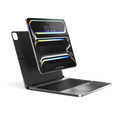
Get real work done on your 13″ iPad. Aluminum keyboard, glass trackpad and a MAX View hinge for any angle.
Compatibility: For the iPad Pro 13-inch (M4/M5)
In-stock
Couldn't load pickup availability
Free US Shipping
Arrives 2–4 business days
Free US Shipping
Arrives 2–4 business days
30-day returns
1-year warranty
Not sure which iPad?
Why Brydge MAX 13.0
All-Aluminum Keyboard Case
Premium-grade aluminum keyboard case, weighted at 2.38 lb for optimum stability. Solid on a desk, steady at any angle.
MAX View Hinge
Any angle, flat to upright. Find your perfect typing or viewing position instantly.
Multi-Touch Glass Trackpad
A full glass surface with true gesture support — MacBook Pro-level tracking and precision.
Adjustable Backlit Keys
Multiple brightness levels adapt to any lighting. Type comfortably, day or night.

Brydge MAX 13.0 - Aluminum Keyboard for iPad Pro 13" (M4/M5)
$249
iPad Pro (2024) – M4 | 13-inch | Model A2925, A2926, A3007
iPad Pro (2025) – M5 | 13-inch | Model A3360, A3361, A3362
METHOD 1: On the back of your iPad - "Model A####" –
METHOD 2: Settings → General → About → Model Number
Overall rating: 4.1 / 5 from 89 reviews.
Extremely well made. Very functional, easy to set up and use. Very responsive trackpad. Hight recommended case and keyboard.
Arron B. 5/5 Verified
Brydge MAX 13.0 - Aluminum Keyboard for iPad Pro 13" (M4/M5)
Love my Brydge Max 13.0 keyboard on my iPad Pro 13. It’s built very well and the keyboard works great. Be ready for a bit of weight but the tradeoff is having your iPad well protected in sleek aluminum armor. Highly recommend it!
David C. 5/5 Verified
Brydge MAX 13.0 - Aluminum Keyboard for iPad Pro 13" (M4/M5)
Great keyboard!!!!!
Anthony N. 5/5 Verified
Brydge MAX 13.0 - Aluminum Keyboard for iPad Pro 13" (M4/M5)
Simply Perfect! I highly recommend for anyone that multi tasks to get this, merges with iPad seamlessly and performs perfectly. A little pricing but so is Apples OEM product but this offers stability and is much easier to work with on your lap or just hanging on the couch getting stuff done for work or play.
Faruk B. 5/5 Verified
Brydge MAX 13.0 - Aluminum Keyboard for iPad Pro 13" (M4/M5)
Works great! Top quality build! Love the tilting display! Cons: Heavy Takes a second or two to access the keyboard after sitting a bit. (To turn back on.) Requires charging separately from the iPad. Overall, I have to give it high marks so far. (One week of use.)
Robert J B. 5/5 Verified
Brydge MAX 13.0 - Aluminum Keyboard for iPad Pro 13" (M4/M5)
Great
Mert E. 5/5 Verified
Brydge MAX 13.0 - Aluminum Keyboard for iPad Pro 13" (M4/M5)
A very handy piece of hardware. A bit heavy, but very well constructed. I’ve only used it a few days and am enjoying it. I had to send one back for replacement. Customer support was was very good and speedy.
Robert J B. 5/5 Verified
Brydge MAX 13.0 - Aluminum Keyboard for iPad Pro 13" (M4/M5)
Built like a tank…awesome
Aaron M. 5/5 Verified
Brydge MAX 13.0 - Aluminum Keyboard for iPad Pro 13" (M4/M5)
I have had a few types of iPad Pro covers and keyboards, including the ones by Apple. This one is truly amazing and the most versatile, It allows me to use my iPad Pro in. number of modes (e.g. as a small laptop, as a wiring pad, etc.), which is great while I teach or take notes. Very sturdy. Two very minor issues: 1) its on the heavy side for an iPad device but light for a laptop, and 2) in cannot charge or take a charge from the iPad - you need a separate cable to the iPad itself - but a minor inconvenience.
Michael S. 5/5 Verified
Brydge MAX 13.0 - Aluminum Keyboard for iPad Pro 13" (M4/M5)
Is very nice, work's awesome. Just needs a protective case now.
Michael M. 5/5 Verified
Brydge MAX 13.0 - Aluminum Keyboard for iPad Pro 13" (M4/M5)
So durable love it!!! Giving it a professional
Scott K. 5/5 Verified
Brydge MAX 13.0 - Aluminum Keyboard for iPad Pro 13" (M4/M5)
Great product.
James S. 5/5 Verified
Brydge MAX 13.0 - Aluminum Keyboard for iPad Pro 13" (M4/M5)
Got mine delivered in Korea just fine. I mainly do animation work on an iPad, and this case is excellent for working while using keyboard shortcuts. Since the Magic Keyboard is designed in a way that makes drawing impossible, I used the Logitech Combo Touch as an alternative, but its kickstand is too long to use on my lap. This case can be used on the lap like a MacBook, and the hinge is sturdy enough that it does not push back while drawing. It also adjusts to various angles, providing the optimal angle for different situations and postures. The downsides are that the hinge is so stiff that it is hard to open, and that the keyboard has to be charged separately. Even considering that, this is the only case besides the Logitech Combo Touch that allows keyboard shortcut input and drawing at the same time. When factoring in shipping to Korea and customs duties, it may fall short when competing with the Magic Keyboard. However, for artists who primarily use the Apple Pencil and rely on keyboard shortcuts, there is no better case. Rather than focusing on using the iPad like a MacBook, I think it would be better if this case were marketed toward artists. 한국에서 배송 잘 받았습니다. 아이패드로 애니메이션 작업을 주로 하는데 키보드 단축키를 사용하며 작업하기에는 아주 훌륭한 케이스입니다. 매직 키보드는 드로잉을 전혀 할 수 없는 설계이기에 로지텍 콤보 터치를 대안으로 썼는데 킥스탠드가 너무 길어 도저히 무릎 위에 두고 쓸 수가 없습니다. 이 케이스는 맥북처럼 무릎 위에 두고 쓸 수도 있으며 드로잉 시 힌지가 튼튼해서 뒤로 밀리지도 않습니다. 또한 여러 각도로 조절이 가능해 여러 상황이나 자세에서 최적의 각도가 나옵니다. 단점은 힌지가 그만큼 강력해 열기가 힘들다는 것과 키보드를 따로 충전해야 하는 것 정도인데 그것을 감안하더라도 키보드 단축키 입력과 드로잉을 동시에 할 수 있는 것은 로지텍 콤보 터치 이외에는 이 케이스가 유일합니다. 한국으로 오는 배송비와 관세를 합치면 매직 키보드와 경쟁하기에는 부족한 점이 많을 수도 있으나 애플펜슬을 주로 쓰면서 키보드 단축키를 애용하는 아티스트라면 이만한 케이스가 없습니다. 이 케이스는 아이패드를 맥북처럼 사용하는 것에 의의를 두기보단 아티스트를 타겟으로 한 홍보를 좀 더 했으면 어떤가 싶습니다.
Park S. 5/5 Verified
Brydge MAX 13.0 - Aluminum Keyboard for iPad Pro 13" (M4/M5)
I like it but I wish that to be easier more
Ahmed A. 5/5 Verified
Brydge MAX 13.0 - Aluminum Keyboard for iPad Pro 13" (M4/M5)
This key board is high quality and works seamlessly. Looks just like a Mac book. Only thing I would change is to add a pencil holder to hold it while it charges or during transport.
James E. 5/5 Verified
Brydge MAX 13.0 - Aluminum Keyboard for iPad Pro 13" (M4/M5)
I like the keyboard, my only struggle is the mouse pad. My thumb tends to rest and it triggers the cursor to move all over when I’m typing. it’s a bit heavy compared to the Magic Keyboard by Apple. Other than that it a great product.
Santiago O. 5/5 Verified
Brydge MAX 13.0 - Aluminum Keyboard for iPad Pro 13" (M4/M5)
Very good product and it is very functional and went beyond my expectations. I will buy this high-quality and versatile keyboard over Apple’s keyboard.
Yamin R. 5/5 Verified
Brydge MAX 13.0 - Aluminum Keyboard for iPad Pro 13" (M4/M5)
I had the old-school 12.9 and it was great! This one is better in every way, especially the mag-lock that holds the iPad in place. Thanks for the high quality product. Cheers!
Kevin H. 5/5 Verified
Brydge MAX 13.0 - Aluminum Keyboard for iPad Pro 13" (M4/M5)
Great quality and weight really makes it seem like a laptop, which is great. Keyboard functions are super quick and keys feel great. Looking forward to using it more! Really great job on this one Team Brydge!
Anthony C. 5/5 Verified
Brydge MAX 13.0 - Aluminum Keyboard for iPad Pro 13" (M4/M5)
The build quality is bar none, the best out there! It is now even more functional with the Max version so you can angle your screen for a more comfortable viewing experience. The blue tooth connects effortlessly and it just works really well. The keys are well balanced and comfortable to type on. The magnets are very strong as well to keep your iPad attached securely. It does have some heft to it, especially when the iPad is attached, but that was expected.
Jangjin C. 5/5 Verified
Brydge MAX 13.0 - Aluminum Keyboard for iPad Pro 13" (M4/M5)
It is high-quality and love every bit of it. It feels like having an Apple laptop in your hand, I wish it would come with a form fitting cloth bag so it won’t get scratched in travel. The trackpad, if it could be more sensitive to the touch at any point of its surface, all corners included to be as sensitive as apples magic pad. It’s a little hard in some spots, but still does the job well and for being a Mobil iPad keyboard, it is top notch, classy has a great look, and I absolutely love it. From my perspective, hands-down beats the apple magic keyboard because the BRYDGE Max folds backwards to draw or watch a movie. Apple Magic Keyboard, when it’s pushed all the way back, the bottom of the iPad moves forward right up to the edge of the keys on the keyboard so my fingers hit the iPad while typing, definitely a flaw in the design. Other manufacturers I have noticed have followed suit probably cause Apple is always the cutting edge company to follow, though not BRYDGE. BRYDGE thought it through and is just a superb design. Please include a felt bag to protect your product.
Phillip L. 5/5 Verified
Order was shipped promptly and arrived on time. Product works well with my iPad M4 and seems to be a higher quality build than previous ones I have owned.
John S. 5/5 Verified
Excellent thank you very much amazing service.
Kevin D. 5/5 Verified
It’s amazing
John S. 5/5 Verified
💯Fantastico! Non potevo chiedere di meglio. Onestamente mi ha stupito e non mi ha dato nessun problema! 5 stelle su 5! 💯
Leonardo G. 5/5 Verified
Nice product but heavy
Toulik A. 5/5 Verified
Excellent and very professional keyboard. Makes iPad Pro seem like a laptop!
John J. 5/5 Verified
Super fast shipping. Arrived well packaged. Product is so solid. 100% better than the Apple keyboard. A bit heavy. But that keeps the iPad from tipping. Which was an issue I had with the older version.
K T. 5/5 Verified
Excellent iPad Pro Keyboard Case Super premium. Outshines Apple Original Magic Keyboard Case in all the different positions and angles!!!
Jeremy H. 5/5 Verified
It’s everything that i expected it to be. The trackpad took a little bit to get used to, but the shortcut to disconnect it helped a lot. Other part from that, it’s really easy to use. The hinge feels slightly weak, but don’t have any problems. I’ve consistently been using my iPad as a laptop with this keyboard.
Andrew I. 5/5 Verified
I own an iPad Pro and have used Apple's Magic Keyboard in the past. While I liked the overall experience, I was never a fan of the exterior material because the area around the camera cutout would eventually begin to peel. The Brydge Max+ 13.0 has been a pleasant surprise. Not only is it exceptionally well built, but its all-aluminum construction gives it a premium feel that rivals, and in some ways exceeds, the Magic Keyboard. The build quality is outstanding, and it feels like a product designed to last. I am looking forward to seeing how it holds up over time, but my hope is that it lasts for the entire life of my iPad. If it does, Brydge will have earned a long-term customer. So far, I have been very impressed and would definitely recommend it to anyone looking for a premium keyboard case for their iPad Pro.
Jorge E. 5/5 Verified
Simply love this Keyboard cover. I do prefer it over the Apple Magic Keyboard, which I also own. It’s much better built.
Ray C. 5/5 Verified
Nice construction and appearance. I really like it. My iPad Pro feels more like a “pro” now! Thank you…….
Jerry L G. 5/5 Verified
It’s perfect to turn your iPad Pro into a laptop. The keyboard is nice to type on and being able to turn off the track pad is a plus for me.
Brian H. 5/5 Verified
This is exactly what I was looking for! The flexibility of an iPad with the functionality of a laptop.
Marcus C. 5/5 Verified
I like the protection it provides, even though the iPad has inadvertently become detached a couple of times. However, there is frequently lag in getting the keystrokes to start appearing on the screen, which I'm guessing is due to re-establishing the Bluetooth connection. It's a bit heavier than I would prefer, but I suppose that's the flipside of it giving good protection.
Evan Z. 5/5 Verified
Even better than the magic keyboard
Sarah P. 5/5 Verified
I really enjoy the metal on the keyboard and what really sealed the deal for me was all the adjustable angles. Not only that, but the typing experience with the keyboard is fantastic. Keep making keyboards please, because you guys make the best ones!
Michael W. 5/5 Verified
The produce is I was spect Thanks
Armando R. 5/5 Verified
No comment
Robert M. 5/5 Verified
“This is a game-changer and feels like the first true premium competitor to Apple's Magic keyboard.”
Andrew O'Hara · AppleInsider
Full multi-touch gesture support
Swipe between apps. Scroll through documents. Select text with precision.The glass trackpad surface is also smooth, responsive, and accurate.
Feel The Difference.
Machined from premium aluminum with a finish that matches your iPad. Not just a case. A complete keyboard designed specifically to enhance your iPad experience
Find Your Angle - 270° of viewing freedom.
From focused work to casual use, the MAX View Hinge holds your iPad exactly where you need it. Smooth movement. Secure positioning. Built for stability.
Secure by design.
Drop your iPad in and the SnapFit case takes care of the rest. Strong magnets lock it in place, protected front and back, ready whenever you are.
Open and Work. Instantly.
With Instant-On™ connectivity, your keyboard wakes up the second you hit a key, saving valuable battery life so you can dive straight into your workflow without a single second of waiting. Just open, type, and let the MAX 11.0 automatically reconnect to your iPad. Skip the frustrating pairing menus and power buttons.
Work in any lighting conditions.
Adjustable backlit keys that keep every letter perfectly visible, day or night.
Full-size keys with 1.3mm travel deliver tactile feedback designed for extended typing session
Most keyboard cases are made of plastic. The MAX 11.0 is machined from premium aluminum, matched to your iPad's finish. Every detail considered. Not just a case. A complete keyboard designed to enhance your iPad experience.
The MAX 11.0 was built for the real world. Adjustable backlit keys adapt to any environment, from a dimly lit bar to a bright open-plan office. All-day battery means no excuses, no compromises, wherever the day takes you.
Full-size keys with 1.3mm travel deliver a typing experience that genuinely rivals a MacBook Pro. The all-glass trackpad supports Apple gestures natively, swipe, scroll, and select with precision. Backlit and adjustable. Built for the way you work.
Toggle it on or off instantly, so your iPad works exactly the way you want it to.
Choose the finish that complement your iPad and your style.
A dedicated row of shortcut keys puts volume, brightness, and media controls one tap away.
Our support team is here to help. We’ll be happy to assist with any additional questions.
Please Email Us At:
Support@Uintaproducts.Com
Brydge MAX is available in two sizes, 11-inch and 13-inch, with dedicated versions for newer M4/M5 iPad Pro models and for earlier iPad Pro and compatible iPad Air models.
Choosing the correct version is important. Each MAX keyboard uses a magnetic attachment system specifically designed for its supported iPad models. Because the internal magnet arrangements differ, an incompatible iPad will not attach securely to the keyboard, even if the screen size is the same.
To make finding the right fit easy, we've included a compatibility guide on each product page to help you identify your exact iPad model before ordering.
And if you accidentally select the wrong version, don't worry! Our customer support team will be happy to help you arrange an exchange for the correct model.
Yes. Unlike folio-style keyboards that rely on kickstands or other keyboard designs with limited viewing angles, Brydge MAX combines a rigid aluminum construction with an exceptionally flexible 270° hinge. This delivers a stable, laptop-like typing experience with the freedom to position your screen almost any way you like. Whether you're working at a desk, on the couch, or on your lap, MAX adapts to you, not the other way around.
Most iPad keyboards offer a limited range of viewing angles, but Brydge MAX takes flexibility to another level with its 270° adjustable hinge. Beyond traditional typing positions, you can flip the screen to face someone across the desk, fold it back into a tent-style movie mode, or lower the iPad nearly flat over the keyboard for drawing, handwriting, and calligraphy. The solid construction provides a stable surface for precise Apple Pencil work, making MAX as versatile for creative tasks and entertainment as it is for everyday productivity.
Because a premium iPad deserves a keyboard that looks and feels just as good. Brydge MAX features an all-aluminum construction with finishes designed to complement your iPad's original aesthetics, rather than hide them. Beyond its premium appearance and feel, the rigid aluminum body provides a solid typing platform with minimal flex and a reassuringly substantial feel. It's a thoughtful combination of design, craftsmanship, and functionality that makes MAX feel like a natural extension of your iPad.
Brydge MAX is designed to work seamlessly alongside Apple Pencil, without interfering with the iPad's built-in magnetic attachment and charging functionality on supported models.
To maintain a clean, streamlined design, MAX doesn't include a dedicated Apple Pencil holder. However, for those who prefer to keep everything together, Brydge also offers custom-designed leather sleeves featuring a convenient Apple Pencil loop. These provide a stylish storage solution while adding an extra layer of protection for both your iPad and Brydge MAX keyboard.
Brydge MAX features a custom-designed Magnetic SnapFit system that securely holds your compatible iPad in place without complicated clips or mechanical attachments. Simply position your iPad, and the magnets take care of the rest.
The protective case helps shield your iPad during everyday use while allowing easy attachment and removal whenever you want to use it independently. All essential ports and controls remain accessible.
Yes. Brydge MAX leaves your iPad's USB-C port completely free, allowing you to connect an external monitor, docking station, or other peripherals to transform your iPad into a more capable desktop workstation.
And because MAX connects wirelessly to your iPad, you're not tied to a fixed keyboard position or a physical connection. You can detach and position the keyboard wherever it's most comfortable, giving you greater freedom to arrange your workspace around your needs.
External display capabilities depend on your iPad model and iPadOS version.
Brydge MAX features Instant-On, designed to keep your keyboard ready whenever you need it. After 5 minutes of inactivity, the keyboard automatically enters a power-saving mode to conserve battery life.
When you're ready to get back to work, simply press any key, and MAX will automatically reconnect to your iPad in approximately a second. No need to fiddle with power buttons, manually reconnect, or adjust any settings. Just pick up where you left off.
Brydge MAX features a large glass trackpad that supports the full range of iPadOS multi-touch gestures, just like Apple's Magic Keyboard. From two-finger scrolling and pinch-to-zoom to swiping between apps, accessing the Home Screen, and multitasking, you can navigate your iPad naturally and intuitively.
For a complete list of supported gestures, you can download the Brydge MAX user manual or visit Apple's official guide to trackpad gestures for iPad.
Yes! While Brydge MAX already helps prevent accidental trackpad inputs during everyday typing, it also offers a convenient trackpad on/off shortcut for those who prefer complete control.
Simply press Fn + Space to temporarily disable the trackpad, making it particularly useful during longer typing sessions when you want to eliminate unwanted cursor movements entirely.
When you're ready to use the trackpad again, just press Fn + Space once more. No need to navigate through settings or interrupt your workflow.
Brydge MAX features an adjustable white LED keyboard backlight, making it easy to see and use your keys in dimly lit environments, whether you're working late, traveling, or relaxing on the couch.
Choose from three brightness levels to suit your surroundings, or turn the backlight off completely when it's not needed to conserve battery life.
Simply press Fn + Right Command (⌘) to cycle through the three brightness levels and the off setting. No need to navigate through menus or settin
Yes, but not very often. Brydge MAX features a built-in rechargeable battery designed to last up to 3 months between charges, depending on usage and backlight settings. You can conveniently monitor the keyboard's battery level directly in iPadOS and recharge it when needed.
Unlike keyboards powered directly by the iPad, MAX uses its own battery, so typing doesn't draw power from your iPad. Its wireless connection also gives you complete freedom, allowing you to use the keyboard even when your iPad is detached, positioned elsewhere, or connected to an external display.
Charging is simple, too. MAX uses USB-C, so you can use the same charging cable and power adapter you already use for your iPad.
Handy tip: If you're ever caught with a low keyboard battery while on the go, you can even charge MAX directly from your iPad using a USB-C to USB-C cable. Just in case!
Both Brydge MAX and Apple's Magic Keyboard offer a premium typing experience, but with some important differences in design and functionality.
Brydge MAX features an all-aluminum construction with finishes designed to complement your iPad, while Apple's Magic Keyboard combines an aluminum palm rest with a soft-touch exterior. MAX also offers 1.3 mm of key travel compared to Apple's 1 mm, providing a deeper, more tactile typing experience.
Perhaps the biggest difference is flexibility. Brydge MAX features an exceptionally versatile 270° hinge, offering significantly greater freedom to adjust your screen, from everyday typing positions to presentations, movie mode, and drawing.
MAX also connects wirelessly, allowing you to use the keyboard independently of your iPad, even when detached. Apple's Magic Keyboard is lighter and uses a direct connection that requires no separate keyboard charging.
Ultimately, Brydge MAX is an excellent choice for those who value premium aluminum construction, exceptional viewing flexibility, and a more versatile, laptop-like iPad experience.
Detach your iPad and power the keyboard off first. Wipe the aluminum body and keys with a soft, lint-free microfiber cloth — lightly dampened with water if needed, then dried. Use a soft dry brush for crumbs between the keys.
Never spray liquid directly onto the case, and avoid bleach, ammonia-based glass cleaners, solvents, and abrasive pads — they can dull the anodized finish. If you want to disinfect, use a 70% isopropyl alcohol wipe sparingly on the keys and trackpad only.
iPad Pro (2024) – M4 | 13-inch | Model A2925, A2926, A3007
iPad Pro (2025) – M5 | 13-inch | Model A3360, A3361, A3362
Brydge Max 13.0, Graphite Black
Brydge Max 13.0, Silver
Brydge Max 13.0, Graphite Black Chrome
BRY6052
BRY6053
BRY6054
Length: 11.14 in (283 mm)
Width: 8.46 in (215 mm)
Height: 0.31 – 0.71 in (7.8 – 18 mm)
Weight: 2.38 lb (1.08 kg)
Up to 3 months at 2 hours use per day with no backlight use. Rechargeable via USB-C cable
Up to 40 hours per charge with consistent backlight use. Rechargeable via USB-C cable.
Note: USB-C charging cable is not included.
1-Year Limited Warranty